Workflow Research

PB Analyst Workflow Analysis

How a Pitney Bowes fraud analyst actually researches businesses today. Every detail sourced from her own words and screen shares.

Feedback Interview, Dec 3 2025
TH

Tiara Hilliard

Fraud/Due Diligence Analyst at Pitney Bowes. Works hybrid from Tampa/Land O'Lakes, FL. Reviews loan applications for fraud risk.

Wheeler Applications Ravelin Daily Reviews
Key Insight

She uses T2C to confirm the "no" - not support the "yes"

Tiara doesn't use Trust2Connect as her primary research tool. She uses it as a last resort when her manual research comes up empty. T2C's role today is confirming that data genuinely doesn't exist - validating her negative finding, not accelerating her positive ones.

How she actually uses T2C today

Can't find info on a business → checks T2C → T2C also finds nothing → "I'm not crazy. I'm not able to find anything because you guys are not able to find anything."

How she does NOT use T2C

Does NOT start with T2C. Does NOT use it for Wheeler Applications. It is NOT part of her daily workflow. "My day-to-day process is just not immediately like signing into it."

"If I'm not able to find information on the business, then I will go to your system and put in the business information to see if what you guys are able to find for it. Then from there, I'll be like, oh okay, I'm not crazy."

Tiara Hilliard [9:55]
Two Workflows

How Work Arrives

Tiara handles two types of reviews with very different depth and frequency.

Primary

Wheeler Application

Deep-dive fraud review for a single business loan. Uses a 6-page Word template ("the COVID sheet") to document every finding with source links.

6
Pages
8+
Tabs
~25m
Per Review
~1
Per Month
Daily

Ravelin Daily Review

Higher-volume daily reviews arriving through Ravelin. Less structured process. Uses Trust2Connect as a fallback when she can't find information elsewhere.

?
Volume
Daily
Frequency
Wheeler Template

The 6-Page Document She Fills Out

A Pitney Bowes-branded Word document with a Yes/No/N/a table for each verification section. She showed every page on screen.

Loan Details
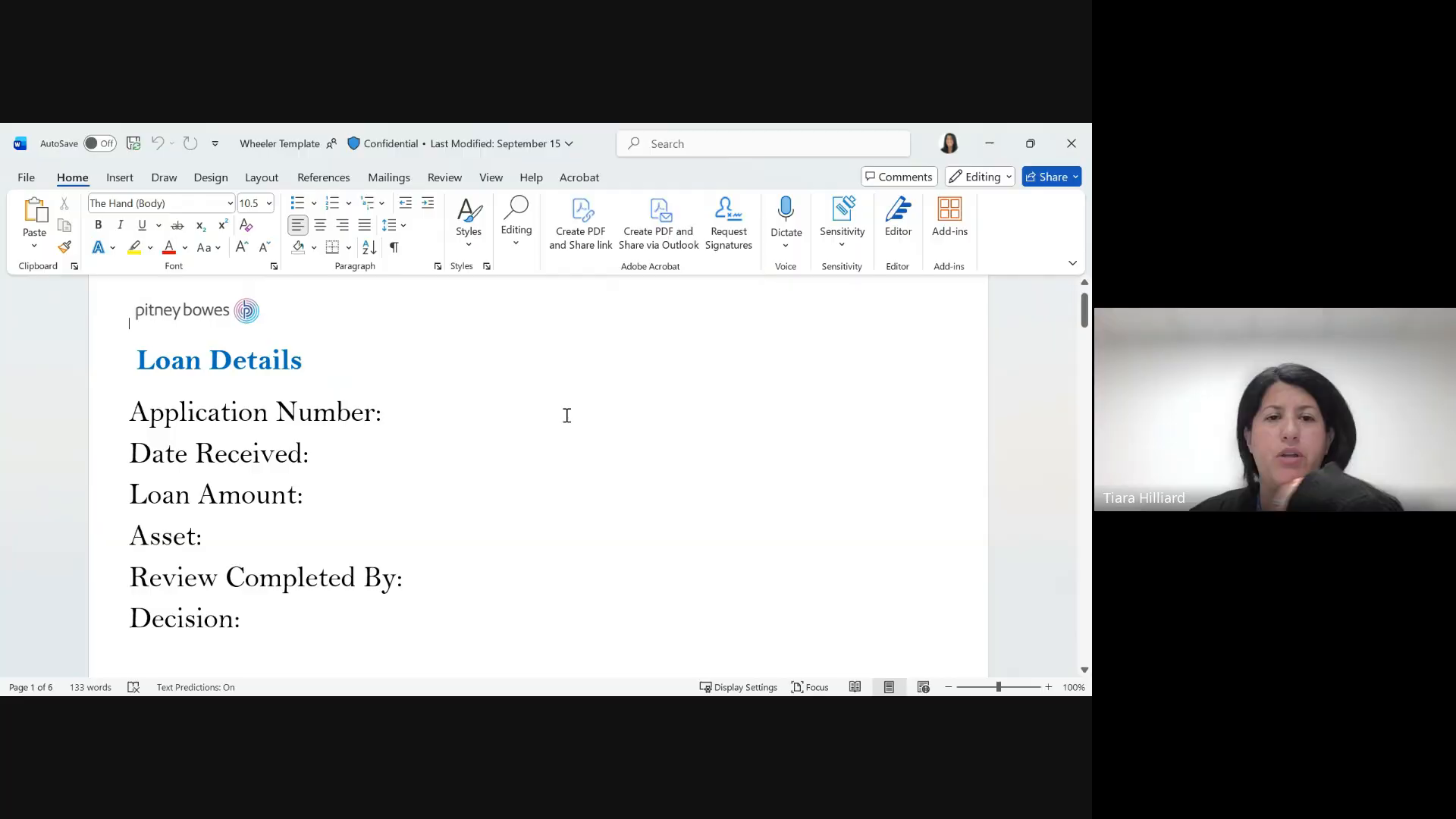
Basic loan information filled at the start of a review
Application NumberText
Date ReceivedDate
Loan AmountCurrency
AssetText
Review Completed ByAnalyst name
DecisionFilled at end
Wheeler Template Page 1 - Loan Details
Wheeler Template Page 1 shown on screen by Tiara [16:05]

Client Verification

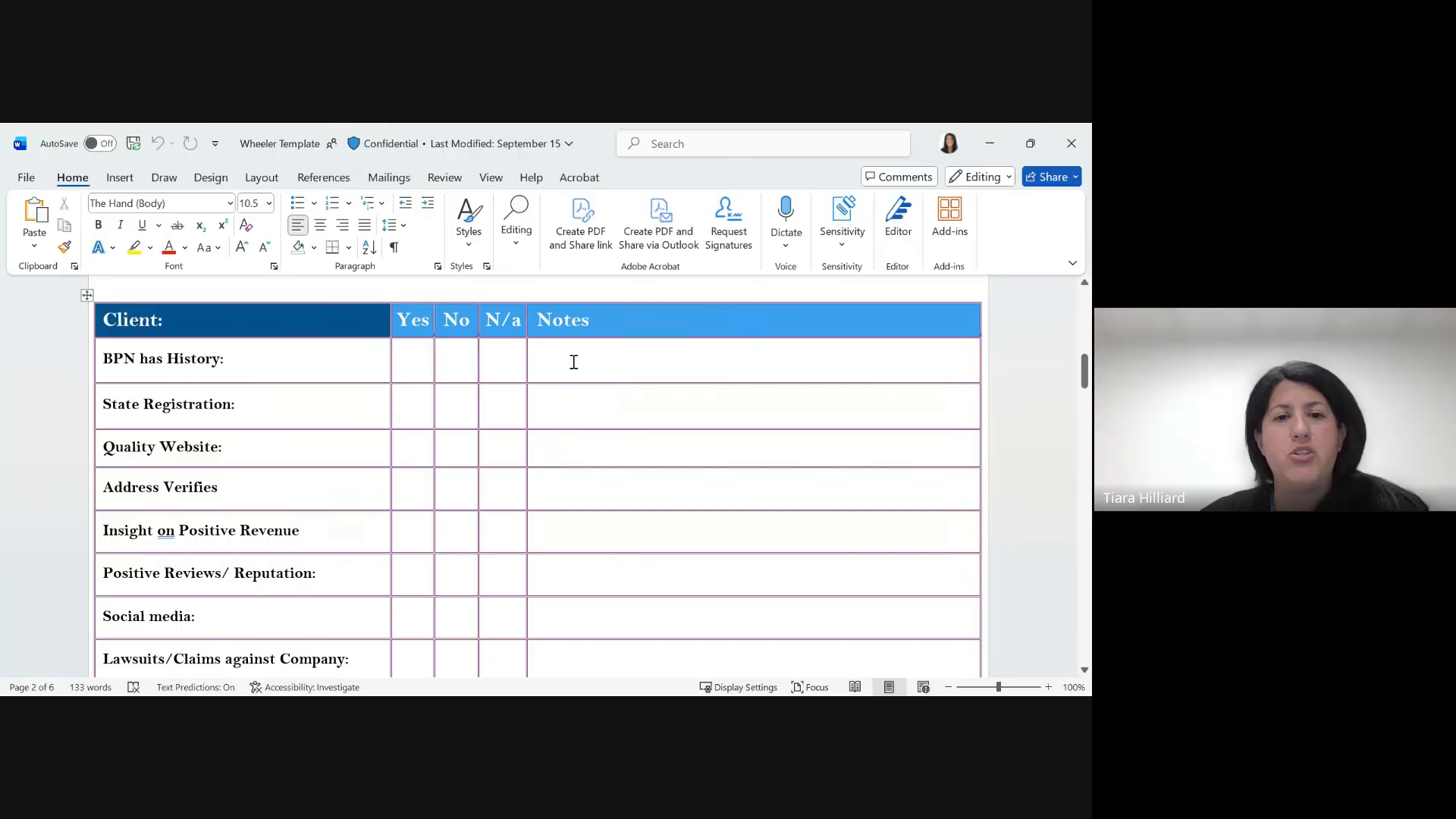
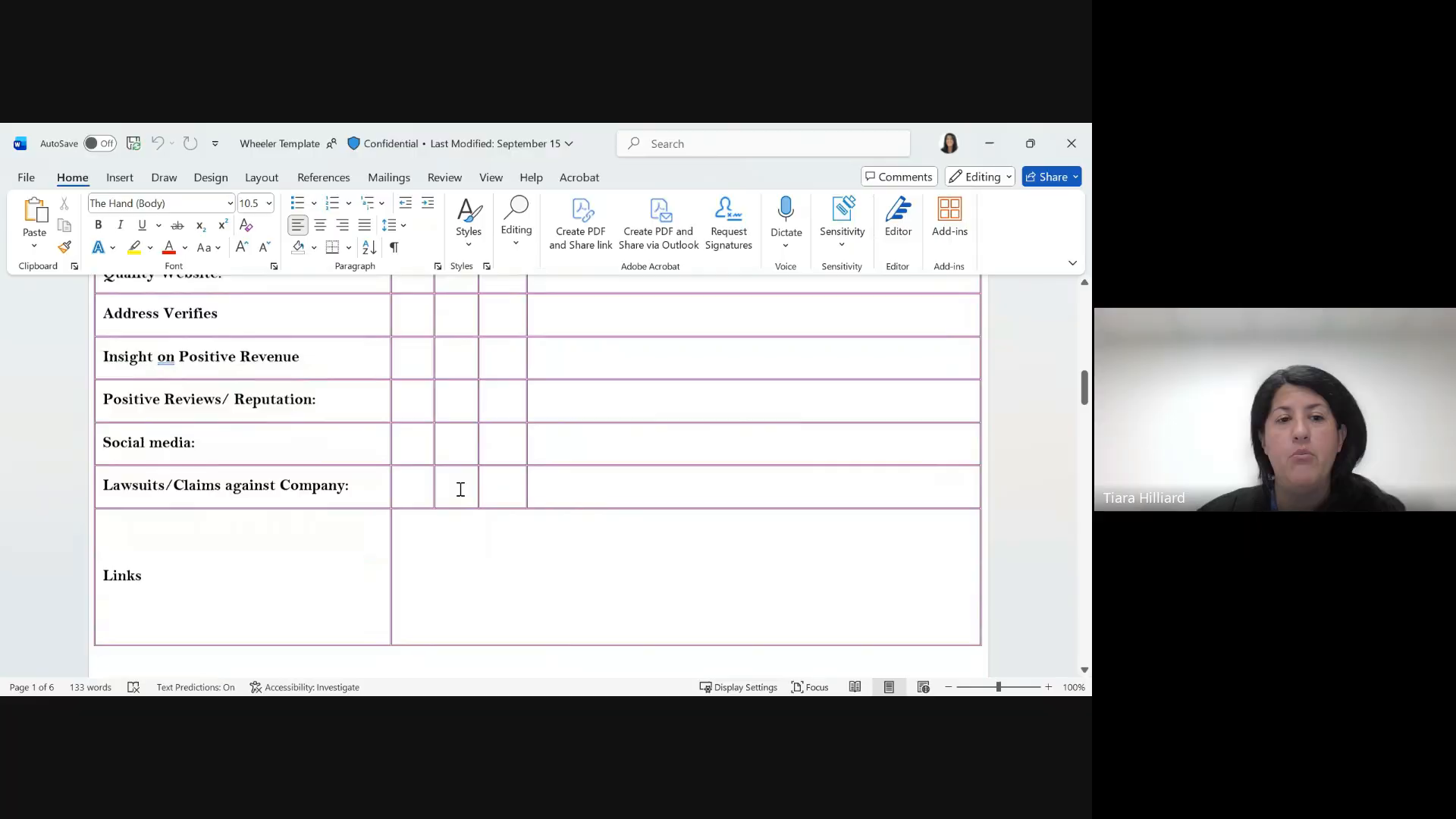
Yes / No / N/a table with Notes column for each field
BPN has HistorySalesforce lookup
State RegistrationOpenCorporates
Quality WebsiteManual visit
Address VerifiesGoogle Maps
Insight on Positive RevenueUnknown source
Positive Reviews / ReputationGoogle Reviews + Yelp
Social mediaFacebook + Instagram
Lawsuits/ClaimsMicrosoft Copilot
LinksAll source URLs copied here
Wheeler Template Page 2 - Client Verification
Page 2: Client verification table - Yes / No / N/a / Notes [16:25]

Applicant Verification

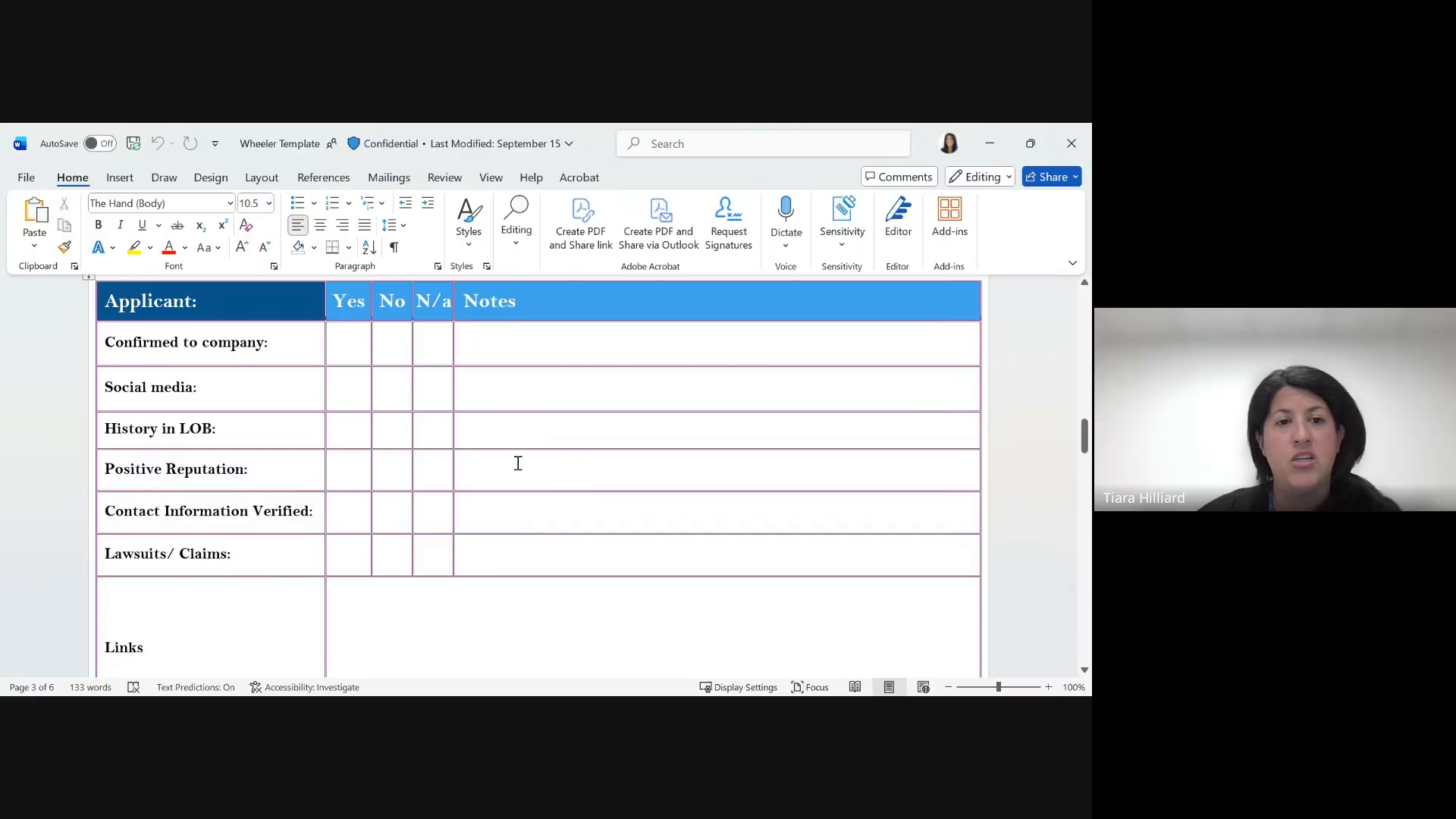
"We verify the applicant information and it's kind of like the same sort of detail" [18:09]
Confirmed to CompanyHow they're tied to the business
Social mediaPersonal accounts
History in LOBLine of Business history
Positive ReputationYes / No / N/a
Contact Info VerifiedYes / No / N/a
Lawsuits / ClaimsCopilot method
LinksAll source URLs
Wheeler Template Page 3 - Applicant
Page 3: Applicant verification - "kind of like the same sort of detail" [18:45]

Vendor Verification

"I would take the vendor name... and I usually will populate that stuff" [18:09]
Address VerifiesGoogle Maps
Insight on Positive RevenueResearch
Positive Reviews / ReputationGoogle Reviews + Yelp
Social mediaFacebook + Instagram
Lawsuits against CompanyCopilot
LinksAll source URLs
Wheeler Template Page 4 - Vendor
Page 4: Vendor verification - same fields as Client minus BPN [19:15]

Personal/Corporate Guarantors

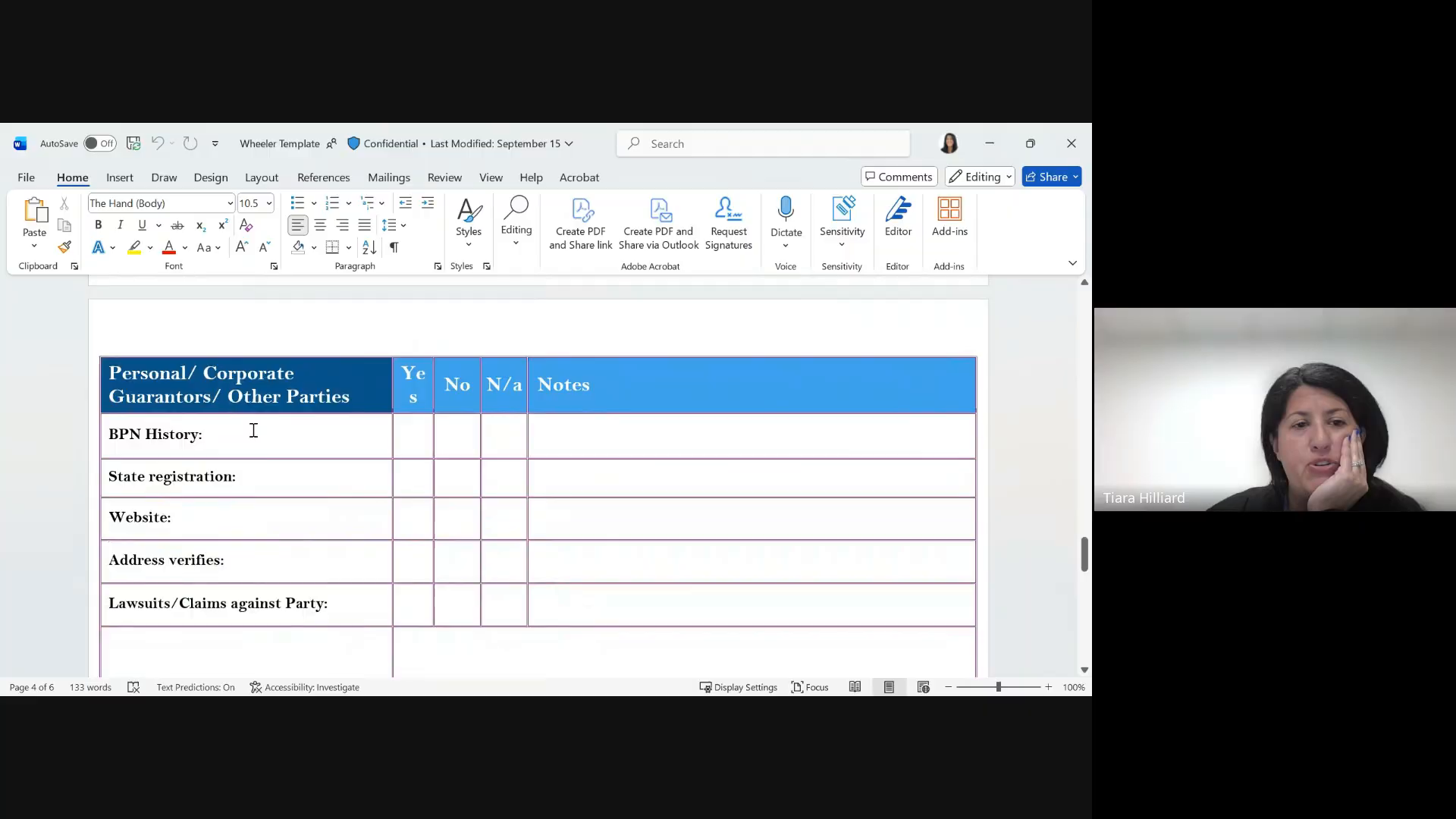
"If there's personal guarantors, usually it's just like a name. If it was a business, I would populate that" [18:09]
BPN HistorySalesforce
State RegistrationOpenCorporates
WebsiteManual visit
Address VerifiesGoogle Maps
Lawsuits/ClaimsCopilot
LinksAll source URLs
Wheeler Template Page 5 - Guarantors
Page 5: Personal/Corporate Guarantors [19:35]

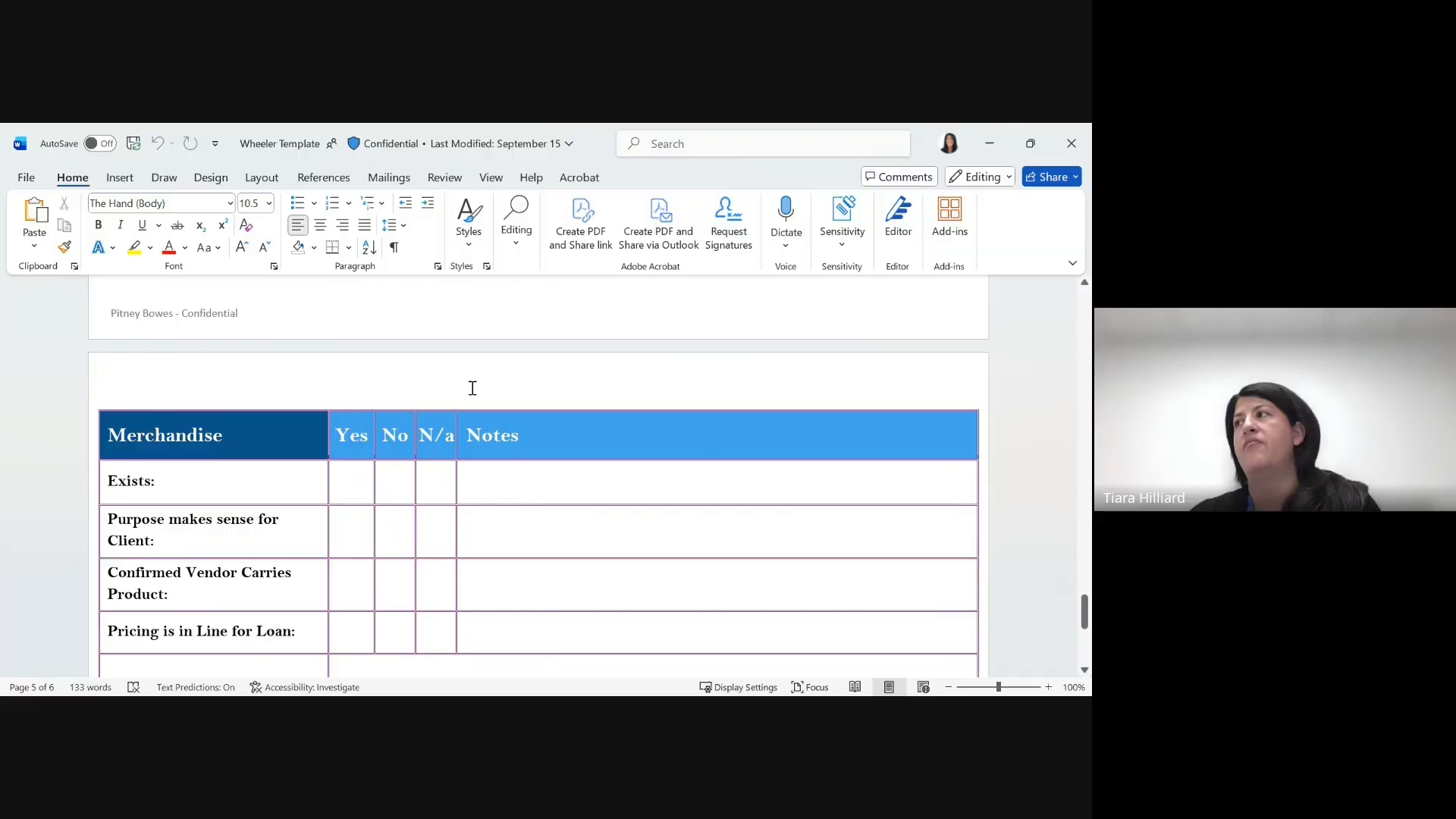
Merchandise

"If it's a truck or any type of equipment, we would indicate that information" [18:09]
ExistsYes / No
Purpose makes sense for ClientYes / No
Confirmed Vendor Carries ProductYes / No
Pricing is in Line for LoanYes / No
Wheeler Template Page 6 - Merchandise
Page 5/6: Merchandise verification [19:55]
Real Example

Completed Review: Rocky's Marine, Inc.

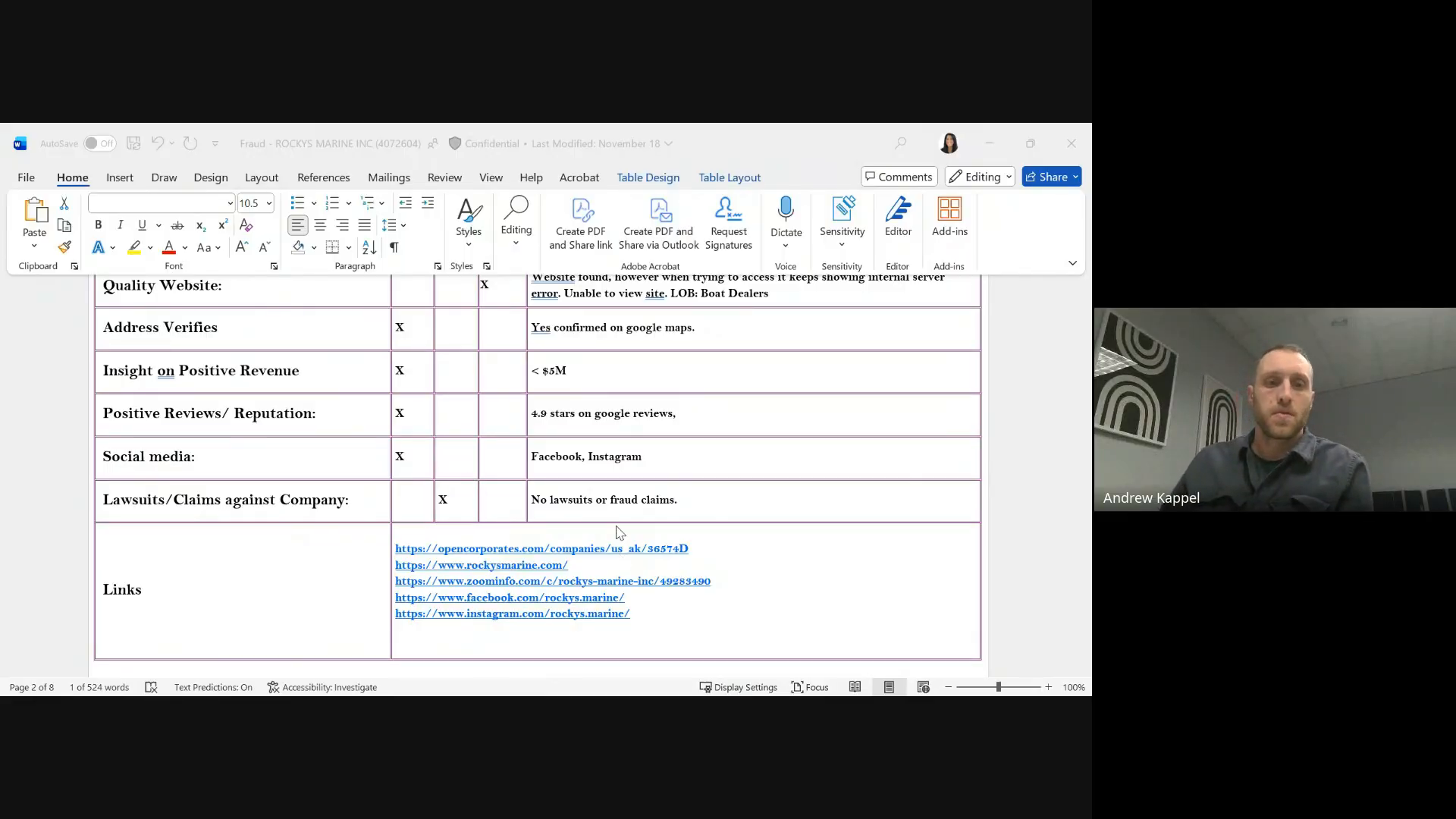
She showed this completed document on screen. This is exactly what she filled in for the Client section.

Rocky's Marine, Inc.
Petersburg, Alaska
Quality WebsiteNote about trying to access a design/landing website
Address VerifiesYes confirmed on google maps
Positive Revenue~$60k
Reviews / Reputation4.8 stars on google reviews
Social mediaFacebook, Instagram
Lawsuits/ClaimsNo lawsuits or fraud claims
Completed Rocky's Marine client verification
Tiara's completed Client section for Rocky's Marine, shown on screen [21:48]
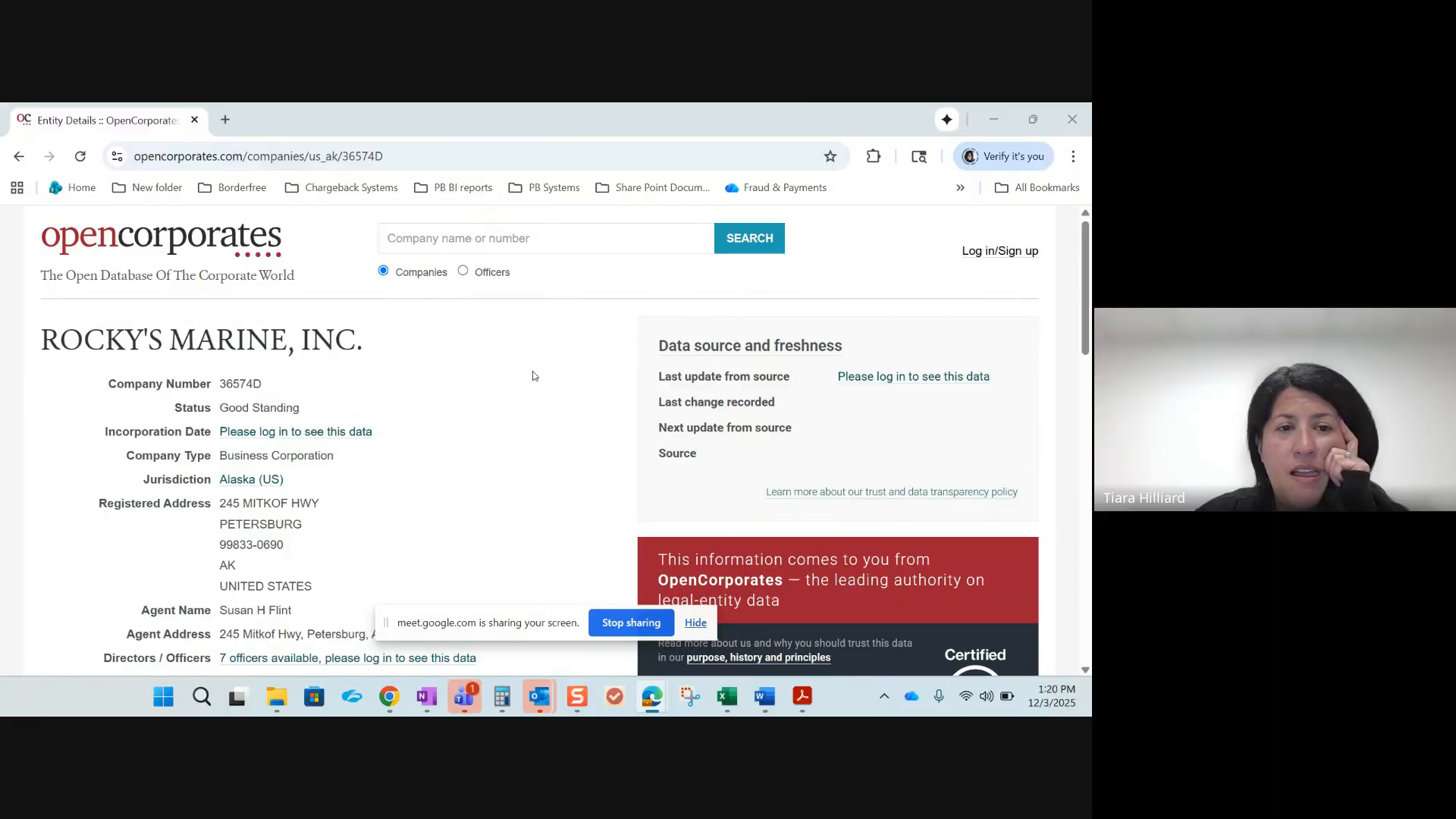
OpenCorporates page for Rocky's Marine
OpenCorporates page for Rocky's Marine, Inc. - Alaska, "Good Standing" [23:15]
Research Methods

How She Researches Each Field

From her own words and the evidence in her completed document.

SF
BPN has History
Salesforce
Looks up the BPN number in Salesforce to check client history.
"We have a client, a BPN number that's associated with it, and we would look this up in Salesforce" [15:59]
OC
State Registration
OpenCorporates
Searches OpenCorporates for the business entity. Checks status (e.g. "Good Standing"). Copies the URL into the Links section.
"Registered with Florida and the status is active" [15:59, 21:02]
🌐
Quality Website
Manual visit
Visits the business website directly and assesses whether it looks legitimate. Rocky's Marine example has a note about trying to access the website.
📍
Address Verifies
Google Maps
Searches the business address on Google Maps to confirm it exists. Rocky's Marine doc: "Yes confirmed on google maps"
Reviews / Reputation
Google Reviews + Yelp
Checks Google Reviews for star rating. Also checks Yelp and copies the URL. Rocky's Marine: "4.8 stars on google reviews"
f
Social Media
Facebook + Instagram
Searches Facebook and Instagram for the business page. Copies profile URLs into the Links section.
AI
Lawsuits / Claims
Microsoft Copilot (Edge)
Current method: Opens Copilot in Edge and types "are there any lawsuits or fraud claims for [business]?"
Hit rate: ~2%. When she finds something, highlights notes in red.
Old method (replaced): Google "[company name] [address] fraud claims or lawsuits" - had to read through results manually.
"I use Copilot and I type that in and I just say like, are there any lawsuits or fraud claims for this business? I found it to be very helpful" [23:42]
After Research

How She Submits

Step 1
Save as PDF
Saves the completed Wheeler Template as a PDF document [18:09]
Step 2
Upload to Rapport
Uploads the PDF to the Rapport system. Can attach multiple PDFs to the same review [13:57, 28:50]
Step 3
Bank Review
Bank reviewers access Rapport. For lawsuits specifically, they follow the links she provided to verify [30:10]
Unknown
Bank Decision
"I don't know if they use that to base their decision on whether or not they're going to continue with the loan" [30:10]
Tool Stack

Systems She Actually Uses

Confirmed from interview evidence only.

SystemPurposeEvidence
Wheeler Template (Word)6-page fraud review documentShowed on screen, walked through every page
SalesforceBPN number lookupsMentioned at [15:59]
OpenCorporatesState registration verificationShowed in doc + navigated to site
Google MapsAddress verificationWritten in doc: "confirmed on google maps"
Google ReviewsStar ratings and review countWritten in doc: "4.8 stars"
YelpBusiness reviews/reputationURL in doc links section
FacebookSocial media presenceURL in doc links section
InstagramSocial media presenceMentioned in doc notes
Microsoft Copilot (Edge)Lawsuit and fraud claim searchesDescribed in detail at [23:42-24:42]
RavelinDaily review intakeMentioned at [11:35]
RapportUpload completed reviews for bankMentioned at [13:57]
Friction

Pain Points She Described

Pain Point 1

Too Many Tabs

Jumping between 8+ sites for a single review. Each field requires opening a new tab, searching, and copying data back.

"I have too many things open right now" [14:43]
Pain Point 2

Needs Source Links

Wants to know WHERE data comes from. Asked for a clickable source indicator on every data point.

"That little circle with the I on it" that takes you to the source website [15:59]
Pain Point 3

Manual Link Copying

Literally copying URLs from OpenCorporates, Yelp, Facebook, etc. into her Word doc one by one.

Pain Point 4

Low T2C Adoption

Admits she's not using T2C as part of her daily flow, only as a fallback when stuck.

"My day-to-day process is just not immediately like signing into it" [9:55]
Decision Tree

Wheeler Application Flow

Tiara walked through this on screen [14:30-20:14] and showed a completed example [21:48-23:25].

Step 1
Open Wheeler Template in Word
6 pages, PB branded. She calls it "the COVID sheet" [15:59]
Step 2
Fill Page 1 - Loan Details
Application Number, Date, Loan Amount, Asset, Analyst name
Step 3
Page 2 - Client Verification
BPN (Salesforce), State Reg (OpenCorporates), Website (manual), Address (Google Maps), Revenue, Reviews (Google + Yelp), Social Media (Facebook/Instagram), Lawsuits (Copilot). Copies ALL source URLs into Links section.
Step 4
Page 3 - Applicant Verification
"Same sort of detail" as Client. Confirmed to company, social media, LOB history, reputation, contact info, lawsuits [18:09]
Step 5
Page 4 - Vendor Verification
Same fields as Client minus BPN. Address, revenue, reviews, social media, lawsuits [18:09]
Step 6
Page 5 - Guarantors
"If there's personal guarantors, usually it's just a name. If it was a business, I would populate that" [18:09]
Step 7
Page 6 - Merchandise
Verify: exists, purpose makes sense, vendor carries product, pricing is in line for loan
Step 8
Review All Findings
Red flags? Highlight notes in RED. "Sometimes if there is something that stands out to me, I'll just highlight my notes in red" [30:10]
Step 9
Save & Upload
Save template as PDF, upload to Rapport for bank review [18:09, 13:57]
Step 10
Bank Review
Bank reviewers access Rapport. For lawsuits they follow links to verify. Outcome unclear to Tiara.
Decision Tree

Ravelin Daily Review Flow

Described verbally [9:55, 11:35]. She did NOT show this workflow on screen.

Daily reviews arrive via Ravelin
Research the business
Found info?
YES → Complete review
Found info?
NO → Check Trust2Connect
T2C finds data? YES → Use it   |   NO → Confirms data doesn't exist

T2C confirms the "no": She primarily uses Trust2Connect to validate that missing data genuinely doesn't exist - not to discover new data.

"I'll be like, oh okay, I'm not crazy. I'm not able to find anything because you guys are not able to find anything" [9:55]

Not in her daily flow: "my day-to-day process is just not immediately like signing into it, which I probably need to just get better at" [9:55]

Research Gaps

What We Don't Know

Things she didn't show or explain during the interview.

1
Ravelin daily review specifics. She didn't walk through this workflow or show the interface. We don't know her first research steps for daily reviews.
2
How she finds revenue data. She wrote "~$60k" for Rocky's Marine but never said where she gets revenue figures from.
3
How she checks Applicant fields specifically. She said it's "the same sort of detail" as Client but didn't show a completed Applicant section.
4
What the bank actually does with her links. She said "I don't know if they use that to base their decision" [30:10].
5
Her Google search patterns. For Website, Reviews, Social Media she didn't describe her exact search queries. We only see final output.
6
How often she does each workflow. Only 1 Wheeler application in November. She didn't quantify daily Ravelin volume.